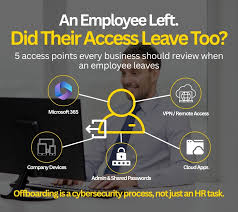

Employee offboarding is often treated as an HR task, but it is also a security process. A departing employee may have access to email, customer records, shared files, financial systems, internal dashboards, cloud storage, website administration, and third-party tools. If even one account remains active after departure, the company may retain an unnecessary security risk.
The safest approach is to remove access as part of a planned checklist rather than relying on memory. The principle is similar to managing any account-based service, whether an employee uses an internal platform or follows a jetx login: once a person no longer needs access, the credentials, sessions, permissions, and recovery methods connected to that person should no longer remain valid.
Start With the Main Business Email Account
Business email should usually be disabled first because it acts as a recovery channel for many other services.
A former employee with access to their mailbox may still receive password reset links, customer messages, invoices, internal documents, and security notifications. Even if other accounts are disabled, control of email can sometimes be used to regain access.
The company should disable the account, revoke active sessions, remove recovery methods connected to the employee, and review forwarding rules. If the mailbox contains information that must be retained, ownership should be transferred or the account should be archived according to company policy.
Remove Access to Cloud Storage and Shared Files
Shared folders often contain contracts, project files, customer lists, reports, internal procedures, and financial documents.
The employee should lose access to cloud storage, shared drives, project folders, and collaboration spaces on the final working day. If files were owned through the employee’s personal business account, ownership should be transferred before the account is closed.
The company should also review externally shared links. An employee may have created links that remain active even after their own account is disabled.
Access removal should cover both direct permissions and group memberships.
Disable CRM and Customer Database Accounts
CRM access can expose customer names, contact details, purchase history, sales notes, contracts, and pipeline information.
The departing employee’s CRM account should be disabled rather than simply left inactive. Administrators should review whether that person had export rights, administrator permissions, API access, or integration credentials.
Customer records owned by the employee should also be reassigned so sales or support processes do not stop.
If the employee exported customer lists before leaving, the company may need to confirm how downloaded files are handled according to internal policy and applicable agreements.
Revoke Access to Accounting and Payment Systems
Any account that can view or move money requires immediate attention.
This includes accounting platforms, online banking, payment tools, invoicing systems, payroll services, expense management, and corporate cards.
The employee should be removed from user lists, approval workflows, and payment permissions. Stored authentication devices or recovery phone numbers should also be updated.
If the employee had access to shared financial credentials, those passwords should be changed even if their individual account has already been removed.
This is especially important when several people previously used one common login.
Remove Website and Domain Administration Rights
Website administration can provide control over content, customer forms, plugins, user accounts, or site configuration.
Employees who worked in marketing, development, or operations may also have access to the company domain, hosting environment, analytics tools, or server dashboards.
These permissions should be reviewed separately because disabling email does not automatically disable external accounts.
The company should identify whether the departing employee had administrator roles, saved API keys, deployment credentials, or access to domain settings.
Domain control deserves particular attention because it can affect both the website and corporate email.
Revoke Password Manager and Shared Credential Access
If the company uses a password manager, the employee should be removed from all shared vaults.
The business should review which credentials were visible to that person. Passwords for sensitive systems may need to be rotated if the employee could view or copy them.
Shared secrets, recovery codes, API keys, and administrative credentials should also be considered.
A password manager simplifies offboarding because access can be removed centrally, but it does not automatically invalidate credentials the employee may already know.
End Active Sessions Across Business Systems
Removing an account is not always enough if active sessions remain valid.
Some services keep users signed in for days or weeks. A departing employee may still have an authenticated session on a laptop, phone, or browser.
Administrators should revoke active sessions where the platform supports it. This is especially important for email, cloud storage, finance tools, CRM systems, and administrator dashboards.
The company should also remove trusted devices and reset persistent authentication tokens where necessary.
Recover Company Devices and Physical Access
Digital offboarding should happen together with physical access removal.
The company should recover laptops, phones, security keys, access cards, storage devices, and other equipment. Devices should be checked before reassignment to ensure company data is preserved and personal access is removed.
Physical entry rights should also be disabled. Office badges, alarm codes, server-room access, and keys can remain security risks even after digital accounts are closed.
Remote workers should have a defined process for returning equipment.
Review Third-Party Tools and Integrations
One of the easiest areas to miss is access to tools managed outside the main company systems.
Employees may have accounts for marketing services, customer support platforms, scheduling tools, design services, developer systems, or vendor portals.
A central software inventory makes offboarding much easier. Without one, companies often discover forgotten accounts months later.
Managers should review both standard tools and services adopted by individual teams.
Make Offboarding a Same-Day Security Procedure
Access removal should be coordinated with the employee’s final working time. Disabling everything too early can prevent them from completing handover tasks, while delaying removal creates unnecessary exposure.
A clear checklist should assign responsibility for each system to HR, IT, finance, or the relevant manager.
The process should cover email, files, CRM, finance, websites, shared credentials, sessions, devices, physical access, and third-party services.
Good offboarding is not based on whether the company trusts the departing employee. It is based on removing permissions that no longer have a business purpose. Once employment ends, unnecessary access should end with it.